Home care operations software

Less admin.
More care.

One platform to match and schedule caregivers, guide every visit, track care tasks plus eMAR/eTAR medication and treatment records, verify work with EVV, and reconcile billing and payroll in an hour — not a weekend.

No credit card No user limits No setup fees
agency.neemfit.com
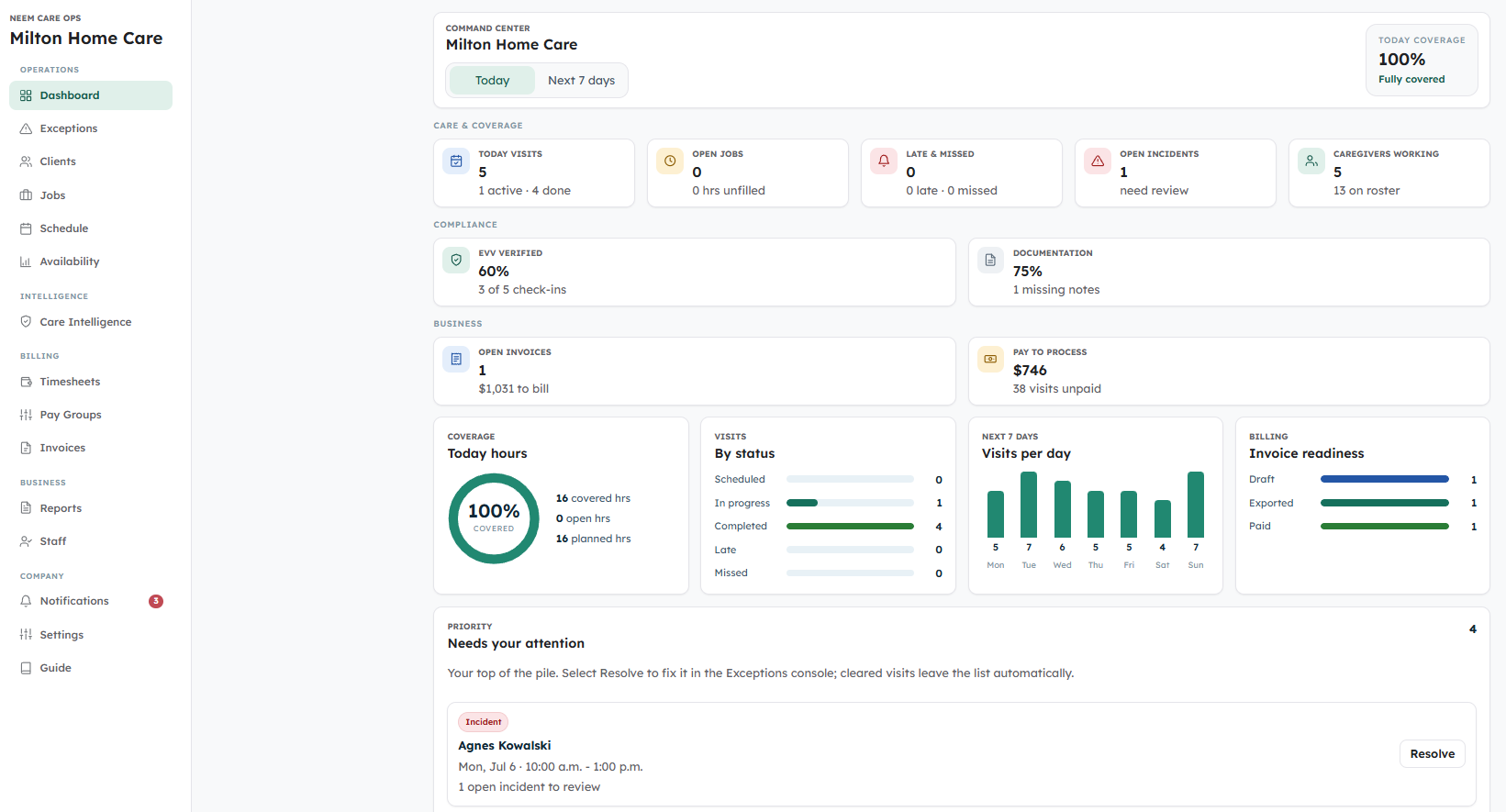
Neem Care Ops agency command center showing coverage, today's visits and the exception queue
Today coverage
100%Fully covered
Amara P. — checked in 8:04 AM
EVV confirmed · Morning care
3x faster
To fill an open shift
Broadcast to confirmed workers in minutes, not an hour of calls and group chats.
Zero
Paper timesheets
EVV-backed actual hours are captured at checkout and reviewed before billing or payroll export.
Online invoices
Stripe payment links included
Send client payment links, collect online, and sync payment status back to Neem.

Scheduling & coverage

Fill open shifts without the phone tag.

See who's available, where they can work, and whether they've been to this client before. Assign from a ranked list, or let caregivers self-claim open shifts — with overlap and compliance checks built in.

Ranked caregiver list with warnings before you assign
Availability, location, compliance, and visit history — surfaced before you commit, not after.
Open-shift self-claim — no coordinator call needed
Workers see open shifts for their area and claim what fits. Overlap and compliance checked automatically.
Recurring jobs built once, managed from one screen
Daily, weekday, or weekly recurrence with a preview of every job before you save.
Open visits & staffing
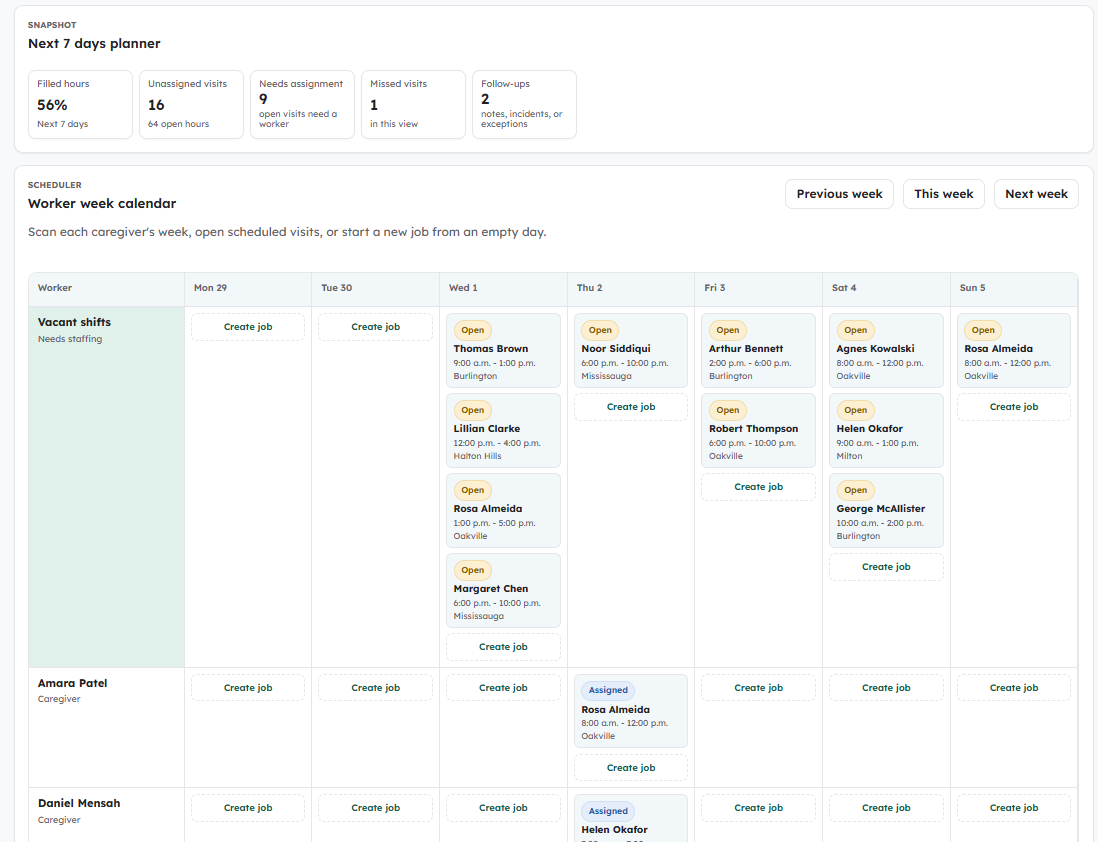
Open visits and staffing board with filled hours, unassigned visits and visit status
Overrides require a reason
Real-world flexibility, without losing the audit trail. Every override stored on the shift.
Caregiver checking her visit details on the Neem app at home
Visit — Margaret R.
Live
3 tasks · 1 medication due · Personal care pending
⚠ Walker required · Latex allergy

Caregiver mobile workflow

Caregivers arrive knowing exactly what to do.

Before walking in, they see the client brief — risks, preferences, home setup, care tasks, and due medication or treatment items. During the visit they work the checklist. At checkout they file notes and incidents. All from their phone. Nothing lost in a text thread.

Full client brief before every visit
Allergies, mobility risks, home access, language, care needs — shown before the door opens.
Care-plan tasks become a live checklist
Completed, skipped, or client-declined — all recorded, all visible to the coordinator in real time.
eMAR/eTAR support for due meds and treatments
Given, refused, missed, or not available — medication and treatment outcomes become reviewable visit records.
Incidents filed at checkout — not hours later
Falls, medication concerns, and safety issues captured in a structured form and routed to the coordinator immediately.

Electronic Visit Verification

EVV-backed visits. Cleaner billing and payroll.

Every completed visit carries an EVV-backed record: scheduled time, actual check-in/out, location status, task outcomes, eMAR/eTAR outcomes, notes, exceptions, and approvals. Review the record once, then bill completed care accurately and export payroll-ready hours without rebuilding the week.
Electronic Visit Verification (EVV) for every visit
Check-in/out times, location status, task proof, and medication/treatment outcomes stay attached to the visit record.
Actual vs. scheduled hours — automatically
Short visits, long visits, no-shows — all reviewed before you overpay or undercharge.
Invoice-ready reports and payroll-ready CSV
Reviewed billable/payable hours, EVV status, payment status, and incidents per row — exported in seconds.
agency.neemfit.com/reports
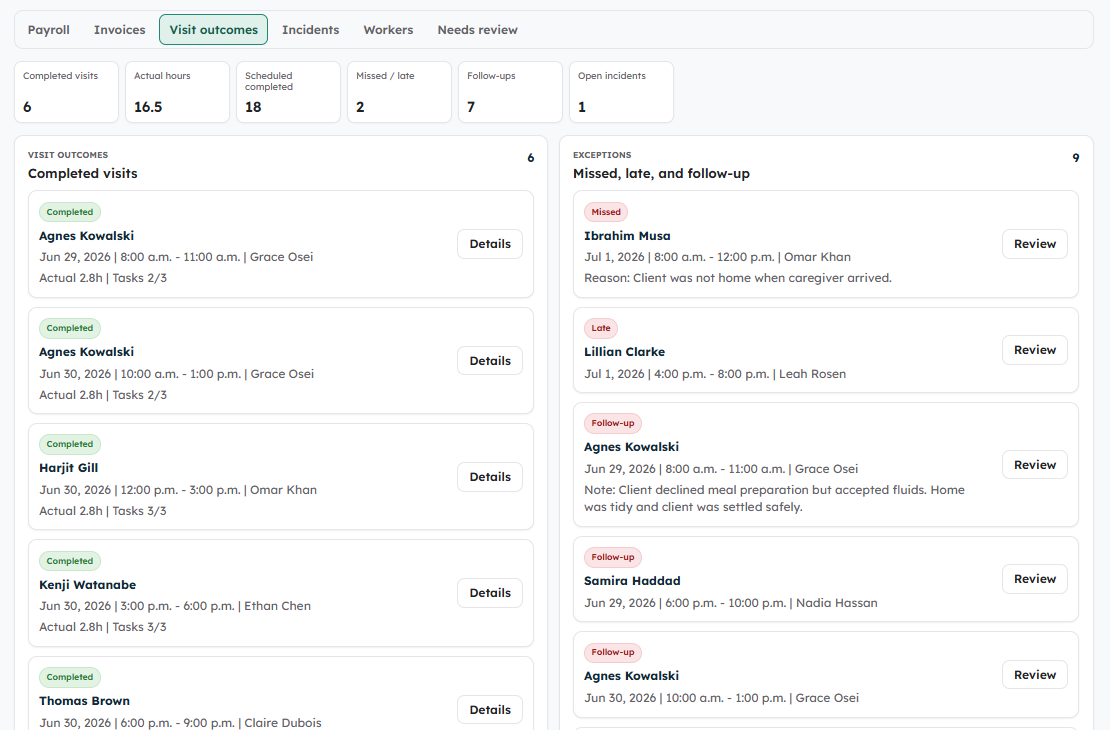
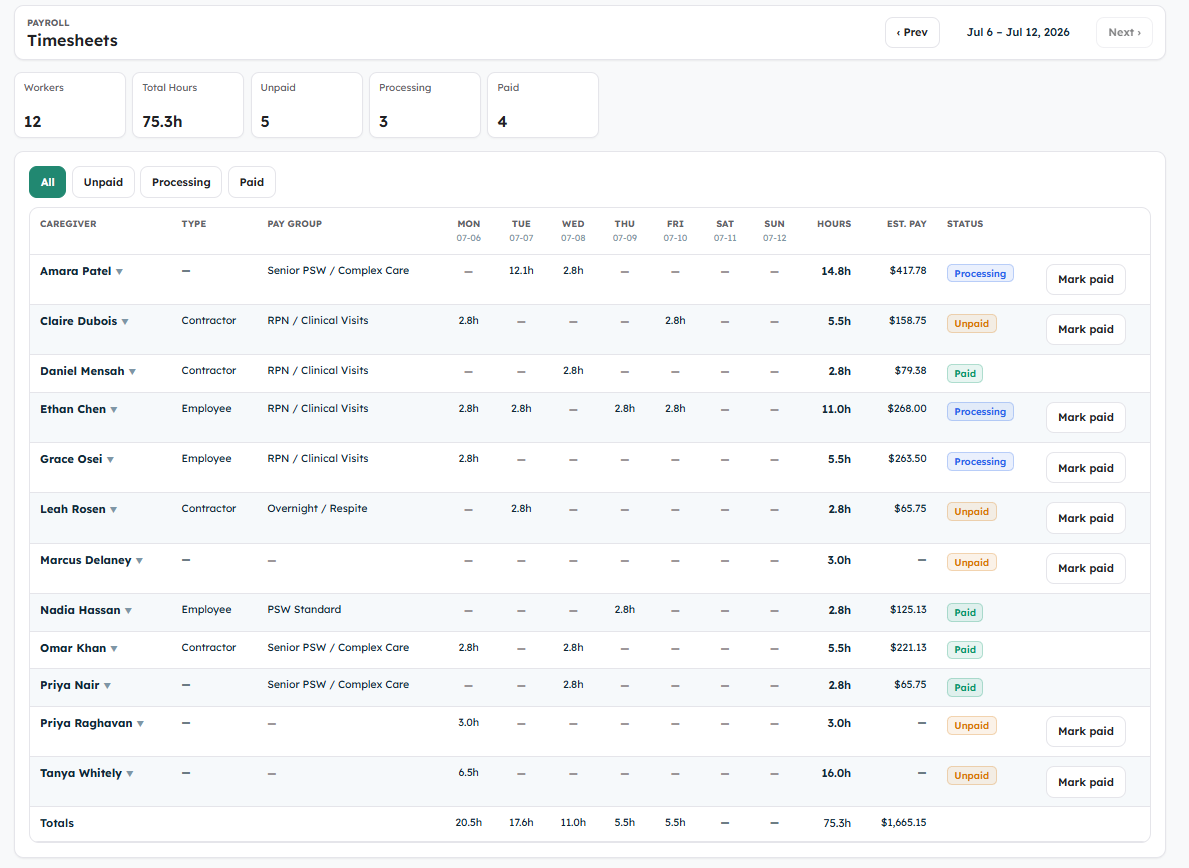
Paperless timesheets report with EVV-backed actual hours, visit status, and payroll-ready review
Payroll CSV ready
Actual hours · EVV · payment status
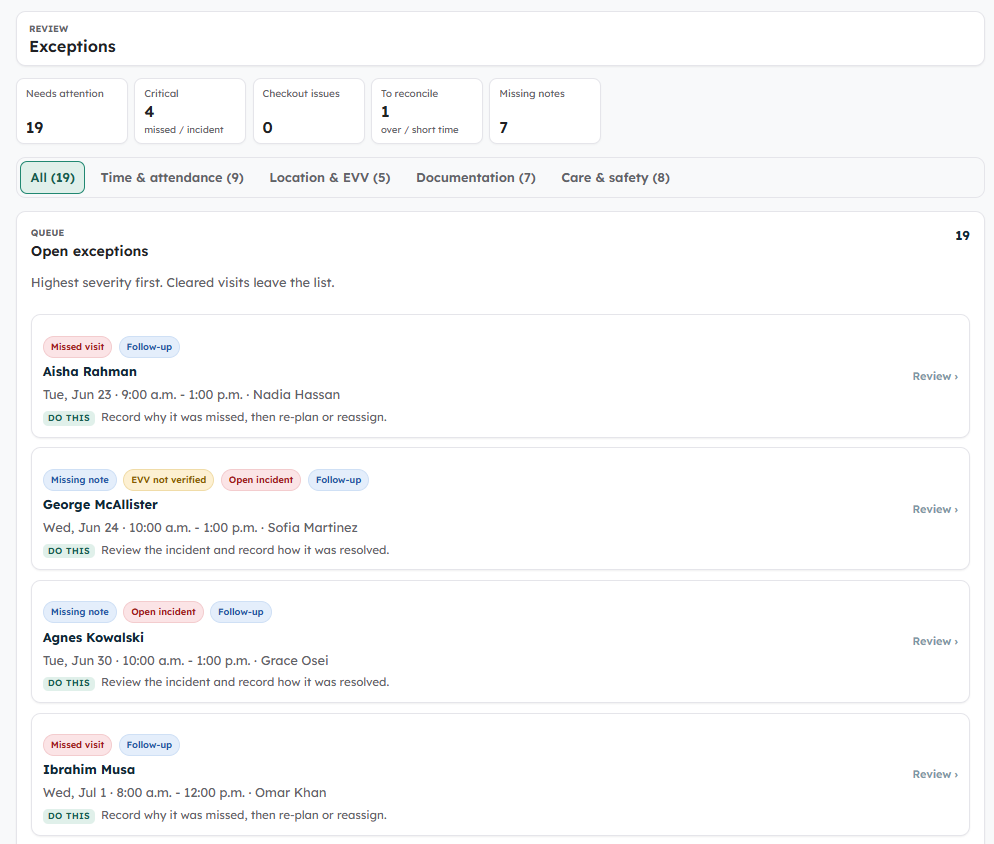
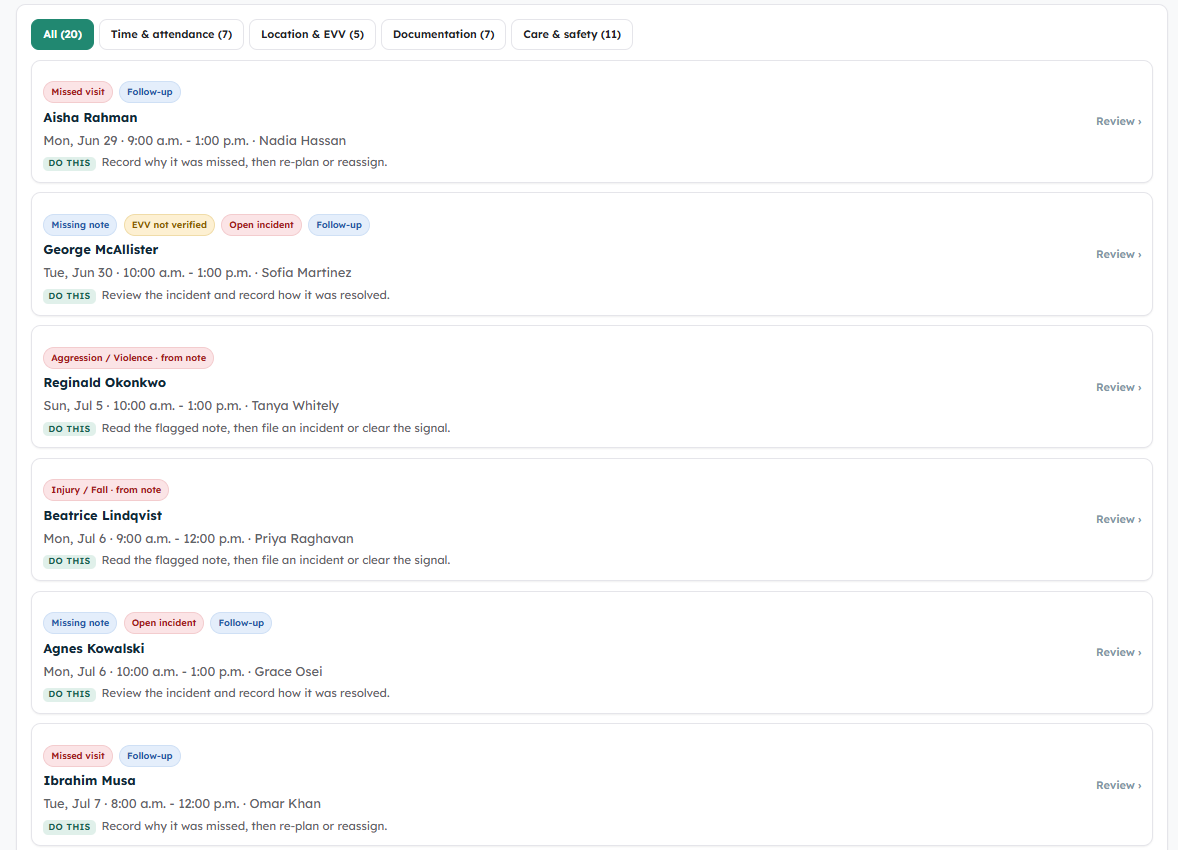
agency.neemfit.com/exceptions
Exceptions console showing categorized issues, guidance and a resolution drawer
Bill vs. pay, reconciled
Approve the exact hours to bill the client and pay the caregiver — separately, with a reason on record.

Exceptions & reconciliation

Catch every problem visit — and know exactly how to fix it.

Missed visits, overdue checkouts, EVV mismatches, over- or under-run time, missing notes, medication and treatment exceptions — all collected in one console, sorted by severity, each with the exact next step. Resolve it in place: manual checkout, waive EVV with a reason, reassign, or nudge for a note.

One queue, sorted by severity — with the fix built in
Each exception opens a drawer with the specific action to take. No hunting across screens.
Reconcile bill and pay separately
Set billable and payable hours to scheduled, actual, or a custom amount — over-runs never quietly inflate a bill or a paycheque.
Every adjustment audited and flowed into billing
Reconciled hours feed straight into reports, invoices, and payroll — one change point, no double entry.

Insight to grow

Know your margin, your risk, and your staff — at a glance.

Reporting isn't just a payroll export. Care Watch brings together margin, utilization, clinical-operation signals, eMAR/eTAR exceptions, revenue at risk, and unbilled work — the numbers and risks you act on to win more business and cut cost.
Money & efficiency in one panel
Gross margin, labor cost, utilization, revenue per visit — and the revenue at risk or still unbilled.
Workforce health, per caregiver
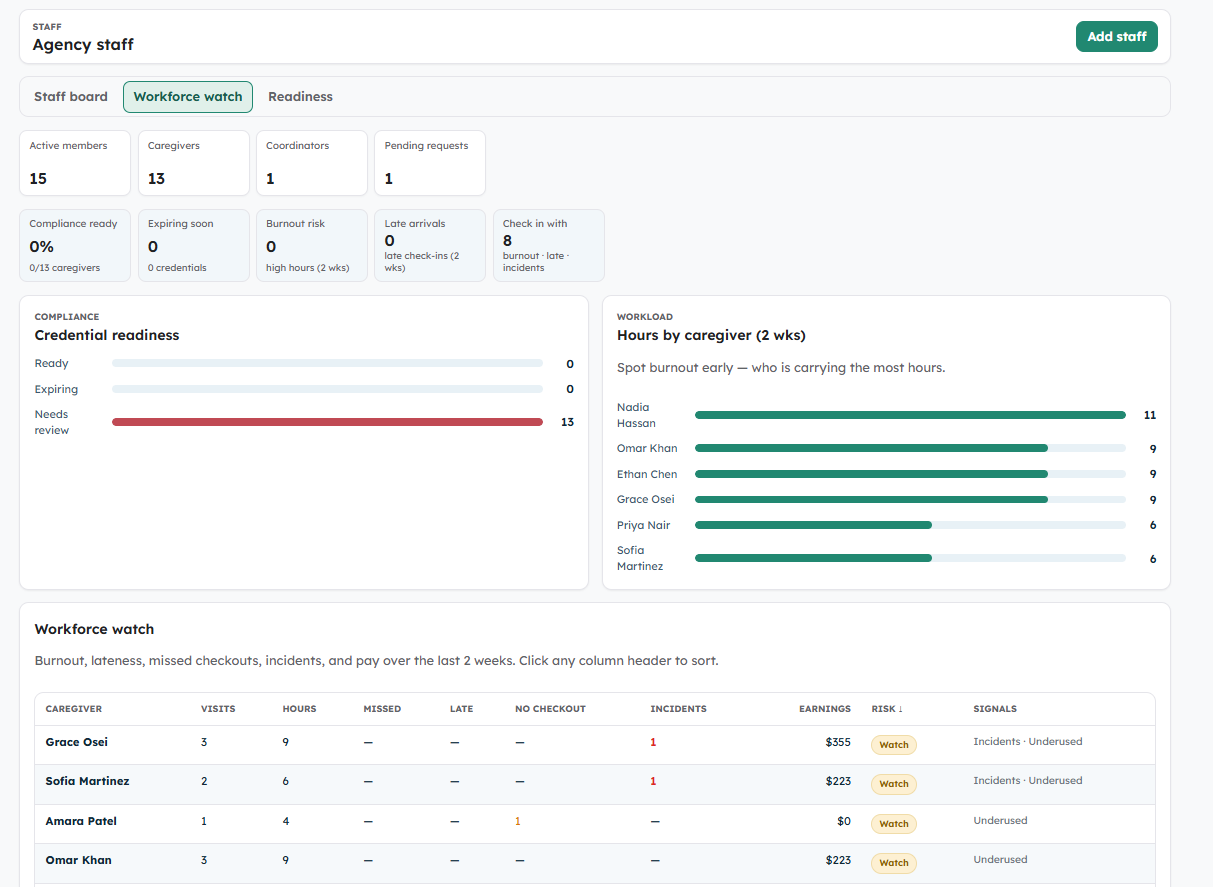
Burnout, attrition, late and missed-checkout rates, and earnings — so you retain your best staff before they leave.
A client pipeline you can see
Intake to active, plus who's connected in the Neem app — track growth, not just today's roster.
agency.neemfit.com/reports
Care Watch visit intelligence showing care review signals, medication and treatment exceptions, and follow-up items
Gross margin
Act on it

One system, end to end

Everything your operation runs on — in one place.

Coverage, exceptions, billing, and insight all live on the same screens your coordinators open every shift.
Agency command center
Command center

Coverage, today's visits, and the priority queue — your morning starts here.

Exceptions console with categorized issues and fix actions
Exceptions console

Every visit that needs attention — sorted by severity, each with the exact fix a click away.

Care Watch visit intelligence with medication, treatment, incident, and follow-up signals
Care Watch intelligence

Medication, treatment, incident, follow-up, margin, and unbilled-work signals — in one review queue.

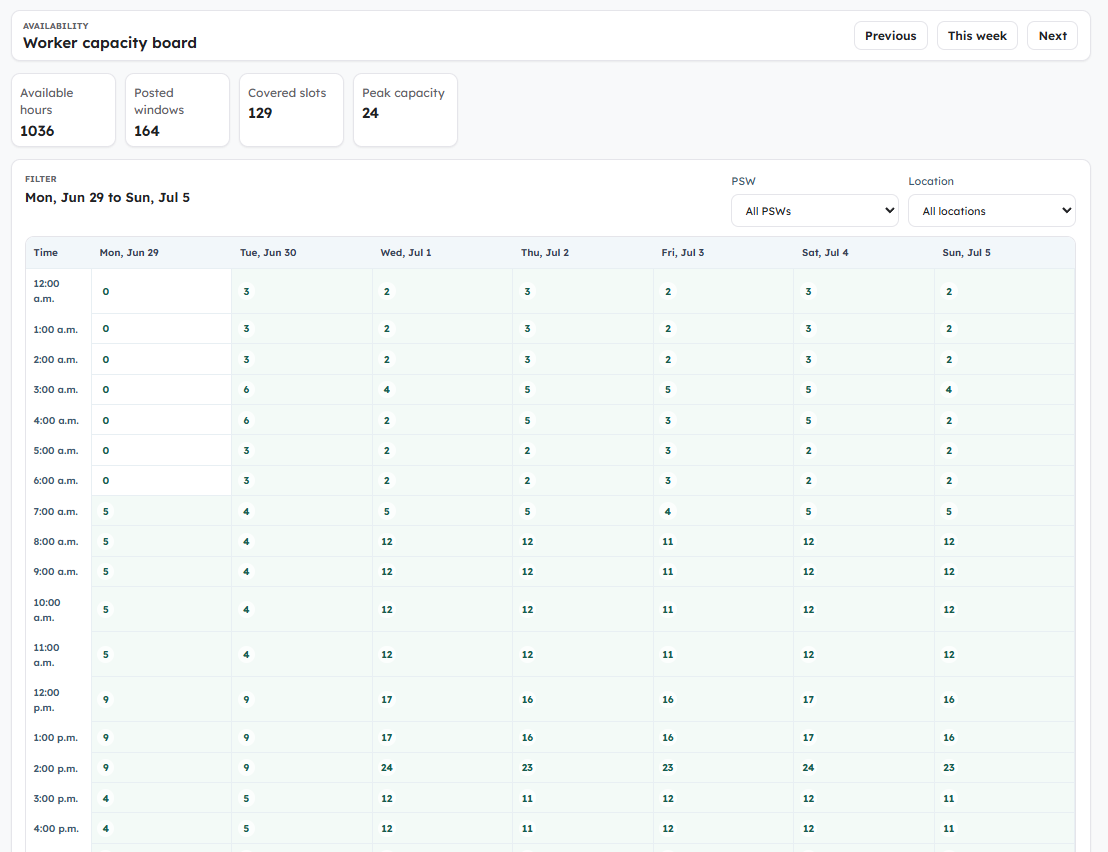
Worker availability board
Availability

See how many caregivers are free each hour, then tap a slot to see exactly who.

Staff intelligence with workforce-health signals
Staff intelligence

Burnout, attrition, and reliability risk per caregiver — spot problems before they cost you staff.

Staff roster board
Staff & roster

Approve PSW requests, manage active staff, and keep inactive workers out of assignment.

Free up to 5 caregivers. Flat rate after.

Free up to 5 caregivers. $79/month after that.

No per-user fees. No premium modules. Add your first 5 caregivers free, forever — full product, no card required. Scale when you're ready: one flat rate, everything included, unlimited caregivers.

Cost comparison

Flat price. Not per-head.

A 30-caregiver agency saves about $2,220/year compared with typical per-seat home care software.

15 caregivers
$1,020
saved / year
30 caregivers
$2,220
saved / year
50 caregivers
$3,900
saved / year
Command center
Today's visits: scheduled, in progress, completed, late, missed
Open-coverage and unfilled-hours summary
Exception queue: missed checkouts & documentation gaps
Follow-up queue with deep links into the exact shift
Smart scheduling
One-time & recurring jobs (daily, weekdays, weekly) with preview
Open-shift broadcast & worker self-claim with overlap checks
Ranked matching by availability, location, capability, continuity
Reassignment with warnings and audited reason-required overrides
Caregiver mobile app
Job list split into today, available, upcoming, completed
Visit prep screen, then a live in-progress work screen
Sticky check-in / checkout with on-the-spot notes & incidents
Tasks, visit notes, incidents, and eMAR/eTAR outcomes in one workflow
Client & care plan
Contacts, SDM/POA, emergency & physician details
Allergies, mobility risks & safety flags up front
Language, cultural, religious & home-setup preferences
Approved services turn directly into PSW visit checklists
EVV proof of service
Electronic Visit Verification with check-in/out and location status
Scheduled vs. actual time on every completed visit
Task proof: completed, skipped, or client-declined
Medication and treatment outcomes attached to the visit
Structured incident reports across 10+ categories
eMAR / eTAR records
Medication and treatment schedules visible during the visit
Given, missed, refused, held, and not-available outcomes
Exception and follow-up flags for coordinator review
Built for documentation, not prescribing or clinical decision-making
Reporting & payroll
Completed visits, actual-vs-scheduled, missed & late reports
Filter by worker, client, location, status, payment, incident
Invoice-ready reports and payroll-ready CSV export
Billable/payable hour review and payment status per job
Safety & accountability
Compliance states & expiry warnings in matching
Self-claim blocked when required compliance is missing
Append-only audit trail of every key action & override
Temporary client access auto-revoked at checkout
Neem connected
PSWs sign in with their existing Neem credentials
Link clients to Neem patient profiles, scoped & consented
Check-ins sync to Neem; access auto-revokes after the visit
Families see appropriate care activity in the Neem app
Exceptions & reconciliation
One console for missed, late, overdue-checkout & time issues
Every exception opens with the exact fix action to take
Reconcile bill and pay separately: scheduled, actual, or custom
Manual checkout, EVV waive, reassign — all reason-audited
Care Watch intelligence
Gross margin, utilization & revenue per visit at a glance
Revenue at risk and unbilled hours surfaced, not buried
Medication, treatment, incident, and documentation exceptions
Staff workforce health: burnout, attrition, late & reliability
Notifications & guidance
In-app inbox with an unread badge on the bell
Coordinators alerted on shift claims, incidents & assignments
Each alert deep-links to the exact shift or exception
Built-in Guide: exception catalog, business rules & thresholds
Also included, at no extra cost
Operational emails, eMAR/eTAR records, Care Watch intelligence, agency branding & reply-to
Invite, open-shift & assignment emails Medication & treatment exception review Care Watch risk signals Incident & follow-up alerts Agency name & reply-to on every email No per-seat charges, ever
Start free — no card required

Neem Intelligence

AI that works inside every decision — not as a separate tool.

These aren't chatbot features you learn on the side. Care Watch intelligence appears inside the panels your team already uses every shift, with human review before action.

01

Smart caregiver matching

Ranks workers by availability, care history, location, continuity, and compliance — best match at the top, every time.

In assignment panel
02

Care note & incident summaries

Summarizes saved tasks, notes, incidents, and follow-up items so coordinators review the right issues faster.

In visit review
03

Medication & treatment watch

Missed, refused, held, or not-available eMAR/eTAR items are surfaced for coordinator review, not buried in visit notes.

In Care Watch
04

Risk & gap flagging

Documentation gaps, clinical-operation exceptions, overtime exposure, and billing inconsistencies surfaced before they become disputes.

In command center
Connected to neemfit.com

Built into the app clients and families already use.

neemfit.com is the Neem Health Companion — a consumer home-care app for clients and their families. Neem Care Ops lives in the same ecosystem, so caregivers, clients, and families stay connected without extra logins.


Caregivers use their existing Neem account
Workers on neemfit.com connect to your agency with a company code. No new sign-up.
Client access scoped to the shift — auto-revoked
Caregivers get client context only for their visit. Access revokes at checkout or reassignment.
Families see what you choose to share
Authorized families see selected visit confirmations through the Neem app. You control what's visible.
An adult daughter showing her mother visit updates on the Neem app at home

Common questions.

Does Neem include eMAR and eTAR?
Yes. Neem supports medication and treatment administration documentation inside the visit workflow. Caregivers can record outcomes such as given, missed, refused, held, or not available, and coordinators can review exceptions. Neem does not prescribe or replace clinical judgment.
What does Care Watch intelligence do?
Care Watch surfaces review signals across visits: missed notes, task gaps, EVV issues, incidents, follow-ups, medication and treatment exceptions, workforce risk, revenue at risk, and unbilled work. It helps coordinators decide what needs attention first.
Who is Neem Care Ops built for?
Home-care agencies and scheduled in-home support teams that manage caregiver scheduling, client visits, documentation, billing, and payroll. That includes respite care, companionship, attendant care, community support, and similar services.
Do caregivers need to download a separate app?
Caregivers use the Neem mobile workspace from their phone. If they already use the Neem Health Companion at neemfit.com, they connect to your agency with a company code — no new account or separate install.
What if location is unavailable during EVV?
Care proceeds. Location unavailability is flagged on the EVV record for coordinator review — caregivers are never blocked at the door by a signal issue.
How does payroll export work?
Filter reviewed visits by worker, client, date, bill/pay status, or exception — then export invoice-ready reports or a payroll-ready CSV with actual hours, EVV status, payment status, incidents, and follow-up flags.
What if a caregiver stays longer or leaves early?
Every over- or under-run visit lands in the Exceptions console. You reconcile it in one place: choose whether to bill the client and pay the caregiver on scheduled, actual, or a custom number of hours — independently, with a reason on record. The adjusted hours flow straight into reports, invoices, and payroll, so an over-run never quietly inflates a bill or a paycheque.
When do I need to pay?
Never, if you stay under 5 active caregivers — that tier is free forever. When you add your 6th caregiver the plan is $79/month flat, everything included, no per-user fees, no setup costs, no long-term commitment.
A caregiver helping an older client, smiling together

Start free with your real agency — no card required.

Real staff. Real clients. Real schedules — not a demo. Free forever up to 5 caregivers. No setup fees, no user limits. If it's not the right fit, you owe nothing.

Start free → Explore neemfit.com No card · No commitment · Free up to 5 caregivers
Start Neem Care Ops free — no card required. Free forever up to 5 caregivers. No setup fee. No user limits.